 Gherkin Studio
BDD for Jira · built on Atlassian Forge
Keep your BDD scenarios after Connect ends.
Write Gherkin scenarios inside each Jira story, keep .feature files in Git, and see which tests pass. Bring your Behave Pro or Cucumber for Jira scenarios with you.
In final development. Not on the Atlassian Marketplace yet.
- Import from Behave Pro and Cucumber for Jira
- GitHub, GitLab.com, Bitbucket Cloud
- 3 months free, then 50%, then 75% of Behave Pro's price
Try it: this editor runs in your browser. Press Format tables, type a new line starting with Given to see step suggestions, or break a line to see the error. It's a simplified version of the editor inside Jira.
Your BDD app runs on Connect, and Connect is ending.
Atlassian Connect, the older platform many Jira BDD apps run on, reaches end of support on 31 January 2027. After that, Atlassian fixes only critical security problems in Connect, and Connect features can be removed with little notice.
Behave Pro and Cucumber for Jira both run on Connect today. Teams that rely on them need a plan, in a year when budgets are already tight.
- TodayYour scenarios live in a Connect app. Everything still works.
- 31 January 2027Connect reaches end of support.
- After thatOnly critical security fixes. Connect features can be removed with little notice.
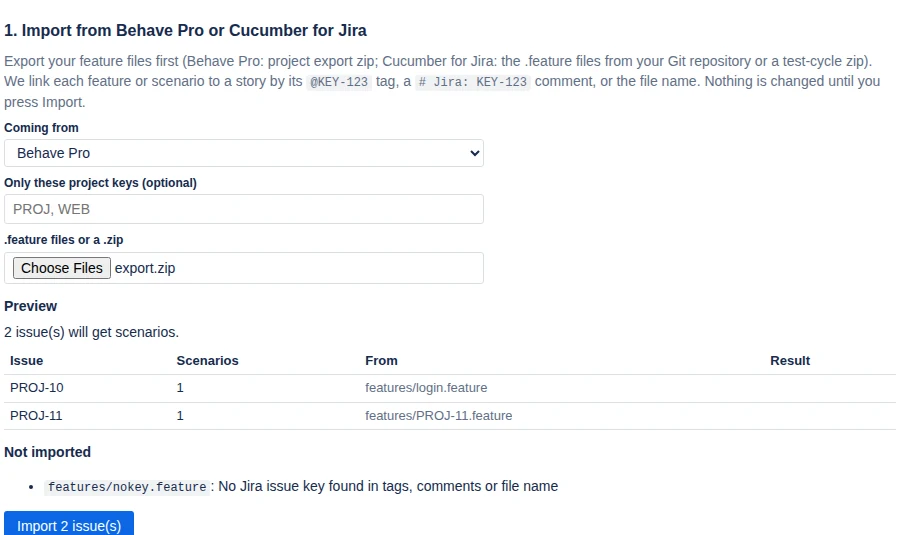
You move your scenarios in four steps.
Nothing changes in Jira until you press Import, and anything we can't match is listed, never dropped silently.
- Export your feature files from Behave Pro (project export) or take them from the Git repository Cucumber for Jira uses.
- In Jira, open Apps → Gherkin Studio and upload the
.featurefiles or the zip. - Check the preview: every scenario is matched to its story by its
@KEY-123tag, a# Jira: KEY-123comment, or the file name. Stories that already have scenarios are skipped unless you choose otherwise. - Press Import. Anything we couldn't match is listed with the reason.
Your team keeps working in Jira.
Write scenarios in the story
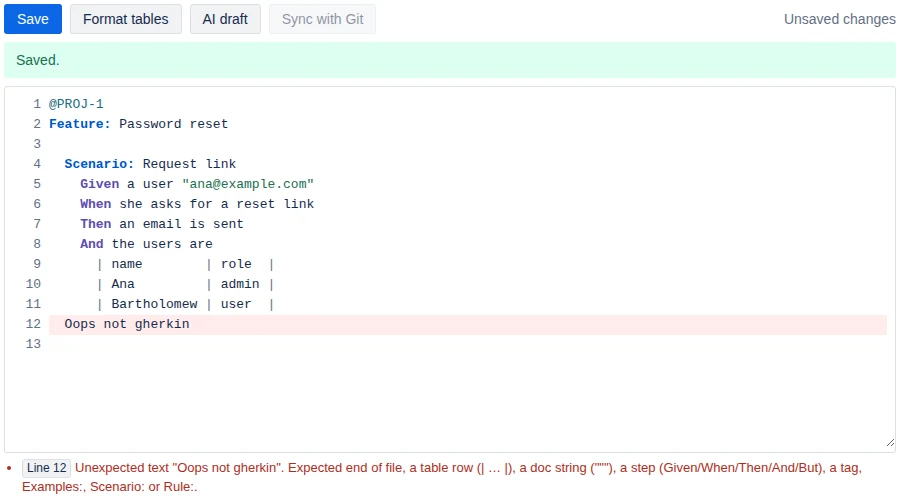
A Gherkin editor in every Jira issue, with highlighting, step suggestions from your project, instant error checks in plain English, and one-click table formatting.
- Click Line N on an error to jump there.
- All Gherkin languages work, from
# language: frto Romanian.

Two-way Git sync that never overwrites silently
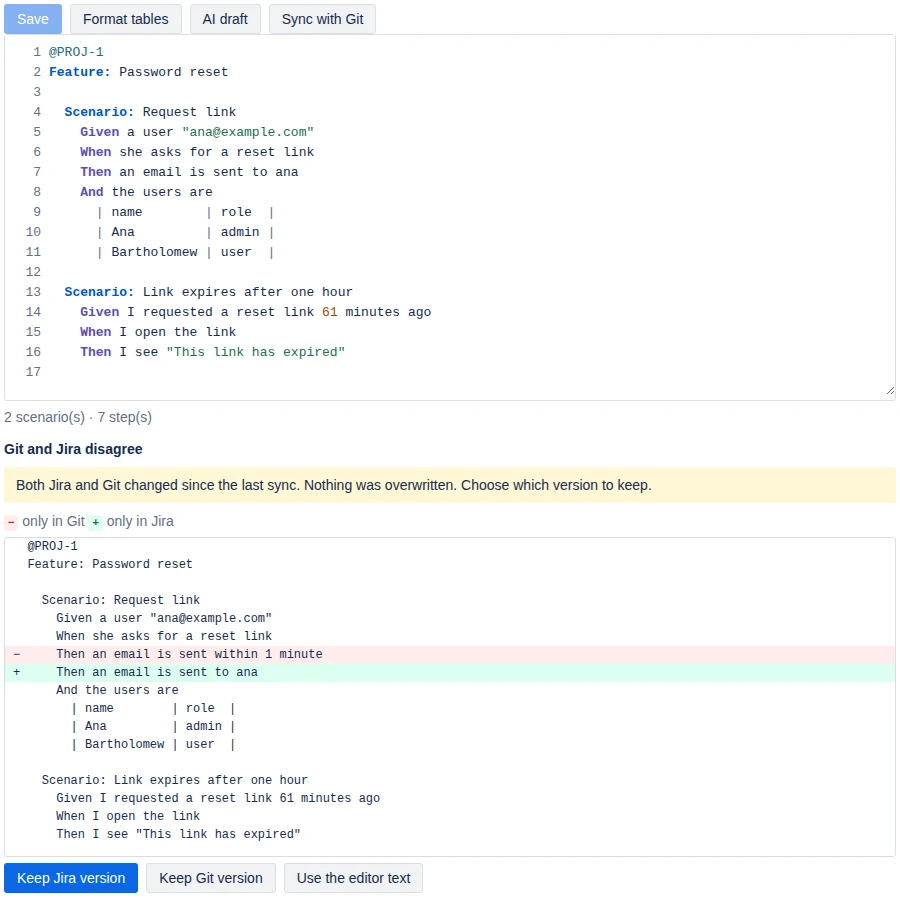
One .feature file per story in GitHub, GitLab.com or Bitbucket Cloud. When Jira and Git both changed, you see both versions and choose.
- Keep the Jira version, keep the Git version, or use the editor text.
- Project admins connect the repository; the token stays in Forge secret storage.
Test results on the story
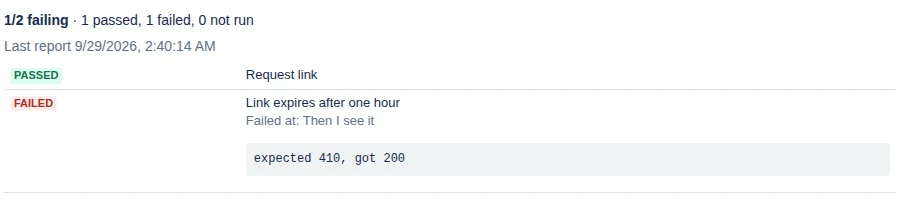
Your CI posts a Cucumber JSON report. Each story shows passing, failing or not run, with the failing step.
- Works with any tool that writes Cucumber JSON.
- Scenarios map to stories through
@KEY-123tags.
AI drafts, only if you want them
Off by default. A Jira admin can switch it on with your organisation's own Anthropic API key. Drafts include the edge cases people forget, and you review them before they're added.
When someone clicks AI draft, the story's key, summary, description, existing scenarios and common step wording are sent to Anthropic. Nothing is sent while the setting is off.
The draft is shown first. You add it or discard it.
Built on Atlassian Forge. The app's code and data stay on Atlassian's infrastructure; it only contacts your Git provider or Anthropic when you turn those features on.
The price, written down before you install.
We're here to help teams through a hard year. The price is written down from day one so nobody is surprised later.
| months | you pay | how |
|---|---|---|
| 1–3 | $0 | Marketplace trial plus a promo code |
| 4–6 | 50% | of Behave Pro's list price for your user tier |
| 7+ | 75% | of Behave Pro's list price, with new features every month |
Before you ask
Is it available now?
Not yet. The app is in final development and will be published on the Atlassian Marketplace. Ask for early access and we'll tell you when it's live.
Does my data leave Atlassian?
Only if you turn on Git sync (to your repository) or AI drafts (to Anthropic, with your key). Everything else stays in Atlassian's Forge storage on your site. See the privacy policy.
Which Git providers work?
GitHub, GitLab.com and Bitbucket Cloud. Self-managed GitLab and Bitbucket Data Center are not supported yet.
How is billing handled?
Through the Atlassian Marketplace, like any Jira app. Atlassian handles invoices and taxes.
Are you affiliated with Behave Pro or Cucumber for Jira?
No. We're an independent alternative. Their names are used only to say what we import from.
What if a feature I need is missing?
Tell us. We build the most requested features first and tell you personally when yours ships.
Move before 31 January 2027, not on it.
Tell us which app you use today and roughly how many Jira users you have. We'll write when Gherkin Studio is live.
Get early access